AI Loops Require Well-Defined Goals
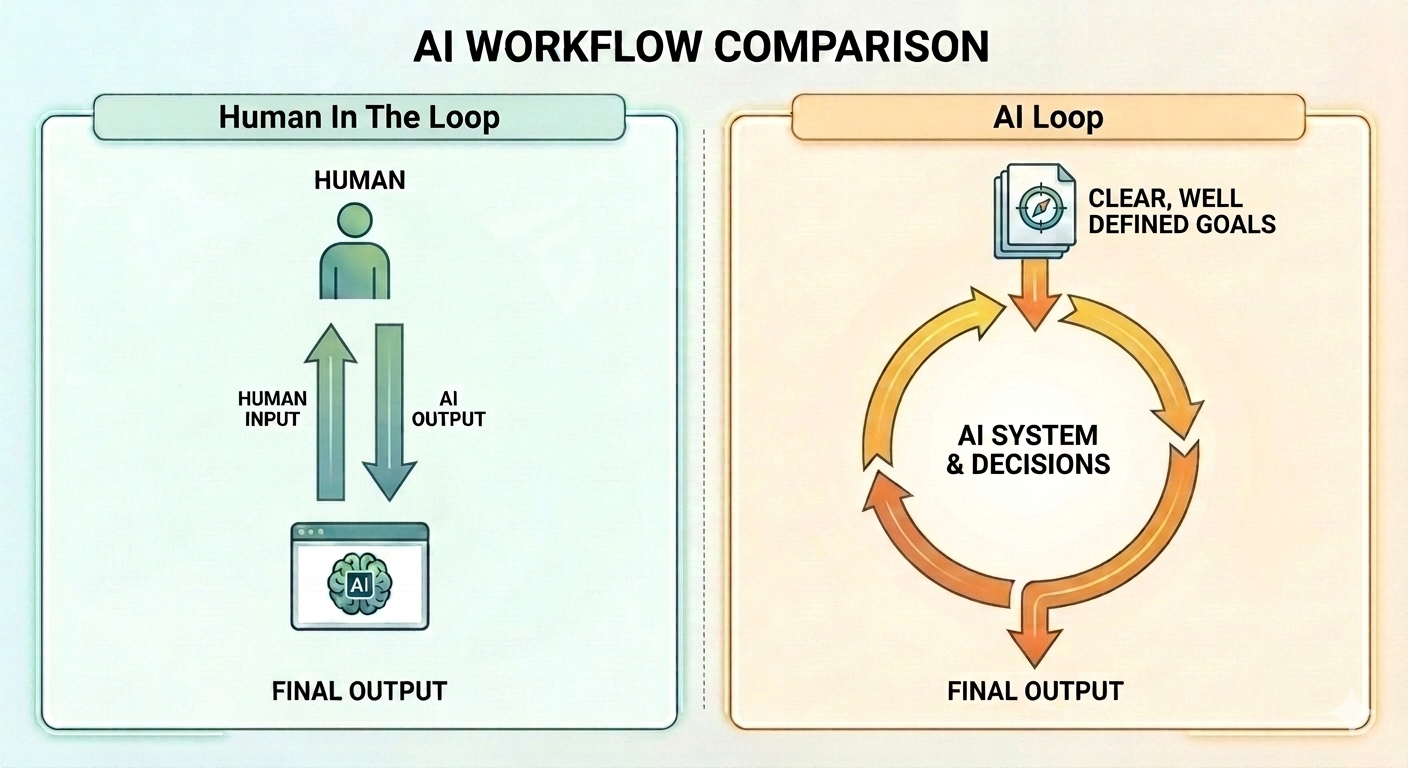
AI “loops” seem to be all the rage right now, but no one really tells you how or when to use them. People act as if loops are the clear next step up from back-and-forth prompting with AI, but the truth is that both approaches are valid ways to work with AI, and each approach is used for different things.
When To Use Human In The Loop
Back-and-forth prompting with a human in the loop at every turn works well when problems or goals are undefined or unknown. This approach feels good for exploratory and creative work. You can even use it when you don’t feel like writing a big spec doc upfront, and just want to jump into the work itself.
Remember that computers and AI exist to do work for you. If you are at a point where creating some big spec doc for an AI loop feels like you’re working for AI, then just start the process yourself until you have a better idea of what the end goal should be. Working with AI should feel natural and fun, not daunting and intimidating.
The cool thing about staying in the loop yourself is that if the AI model is fast enough and your units of work are small enough, you can even get into a good flow state taking turns back and forth with the AI agent. If you do it right, it feels close to the good old days of focused development flow states, but with the ability to move way faster. The goal here is to reach a point where you feel like the output is eventually what you want or close enough to it that you can stop and feel accomplished.
When To Use Automated AI Loops
Automated AI loops really only work when there is a very clear and well-defined end goal. The AI agents have to be able to verify that the task is “done” to know when to stop, and exit the loop. This by definition means that you have to be able to define the end goal up front, before the loop is started.
AI Loops can be great when:
- You know the end goal upfront and can articulate it well
- The end goal is objective and easily measurable by the AI agent (i.e. not a matter of taste)
- You have clear designs or mockups of exactly what you want
- You want to copy existing applications, websites, codebases, or designs
- There is a mechanism to provide good feedback to the AI agent at every turn, like running a test suite until all tests pass and fixing the code until it does
- Automating fixing known bugs or issues with error reports from Sentry, DataDog, or logs as inputs
- You have recurring tasks that are well defined and require the same steps each time
- You are comfortable spending days up-front writing a massive spec document with detailed execution plans and architecture that can drive the creation of an entire working application
If you cannot clearly define a good end goal, your loops can turn into token-burning bankruptcy machines.
Bridging The Gap
Moving from prompting AI agents to fully automated loops can feel like a big jump, but you don’t have to do it all at once. The middle ground in-between “human in the loop” AI prompting and fully automated AI loops can be as simple as a detailed prompt that you keep in your code repository to invoke for repetitive tasks, or a collection of skills that you run manually on the codebase.
I recently helped to automate an AI workflow for a client (through my consultancy) that takes Jira tickets, works them, and then submits PRs back to various code repositories that it did the work in, along with proof of various different verification steps. The first step for that workflow though was actually just a skill (markdown file) that we stored in agents/skills/jira-ticket.md. For the first few weeks, devs would use it in conjunction with the Atlassian MCP to pull Jira ticket details to work tickets locally with a prompt like: /jira-ticket TCKT-1234. They found some issues and edge cases, iterated on it, updated it, and when it was working more reliably, we automated it.
The natural progression here is: before you automate a task with some AI loop or complex AI workflow, ensure it runs and works locally first. This is just one step above manual prompting. Like writing code, this is also an iterative process. You’re not going to get it right the first time. Use it locally with your team until you get consistent results, and then turn it into a loop.
AI loops vs. human in the loop is not either/or. It is both/and. Don’t feel behind if you’re still doing manual back and forth prompting. The difference is just timing, whether or not you have tasks that fit the AI loop model, and, of course, your budget for tokens.
Categories: Software